
NixOS first impressions: writing system-level tests
How reproducibility opens the door for test-driven updates


My motivation for NixOS
I've been using Nix for some time now. I converted my dotfiles to mostly Nix, and I'm very happy with how useful it became. The next logical step is NixOS, that applies the same principles to the whole OS. I've been thinking about how I'll use NixOS for a while and now is the time to actually give it a go.
Usually when people try out an operating system, they go the usual route: try out the installer, get a feel of the default applications, the out-of-box experience.
This is not how I started exploring NixOS: I started by writing tests.
I'm not exactly interested in what desktop environment it comes with or what is the default browser. These can be changed and when I switch to NixOS on my laptop I will make these decisions. What brought me to NixOS is its reproducibility: all the packages and configuration is pinned down to an exact commit. This means I can reproduce a system with the exact versions that are defined there. The exact kernel version, the exact GCC, Python, Bash.
This brings the good practices of software development to the OS: I can switch between commits, reproduce earlier versions, and more importantly: I can try out an update before I actually update the system. Just like how I use NPM, for example. I can update the dependencies locally, try out the new versions, and if I'm happy with them I commit the lockfile. When the change is deployed it will use the new versions and if there is a problem it's easy to roll back.
This is hard to achieve with regular distributions. Take Ubuntu as an example. What is the version of the kernel? That depends on what apt upgrade fetches when
it ran. The result is that I can't go back to a version that was the latest two months ago. NixOS makes it first-class.
Is this a problem? Usually, not. I use Arch at this moment which is the bleeding edge as it gets the newest version from everything almost immediately and it is very rare that an update breaks my system. But it happens nevertheless.
Once my Xmonad config broke after an update and had to change some config files. On another occasion, one of my examples broke on a newer version of Amazon Linux. And of course, Ubuntu major versions usually move things around a bit on the UI, which needs some configuration after the update.
So, while in practice updates are usually fine, I still consider the "enable auto-updates and hope nothing breaks" is not something I'm comfortable with. And if there is a good solution, why not explore it?
How about Docker? Usually, when I mention that I want to solve the reproducibility problem, people mention that. But Docker is not a solution to it, at least
not how it's used in practice. When you start with FROM ubuntu followed by RUN apt update && apt upgrade -y then the image will contain whatever versions
were the latest at the time of building. You can store the result image and roll back to it, but you can't check out the old commit, make changes to it, and
then expect that the versions match. While it solves some of the problems with reproducibility, I find the Nix way more elegant.

Why tests
Reproducibility is nice for rollbacks, but I wanted to take it a step further: only update the system when the new version works. This can be an automated process: update the dependencies, run the tests, and only commit the lockfile if all tests pass. Then the real system can pick up these changes on the next auto-update, usually the next day.
This combines the best practices for keeping a system up-to-date: it is updated automatically from upstream but if there is a problem it will leave the system in the last operational state.
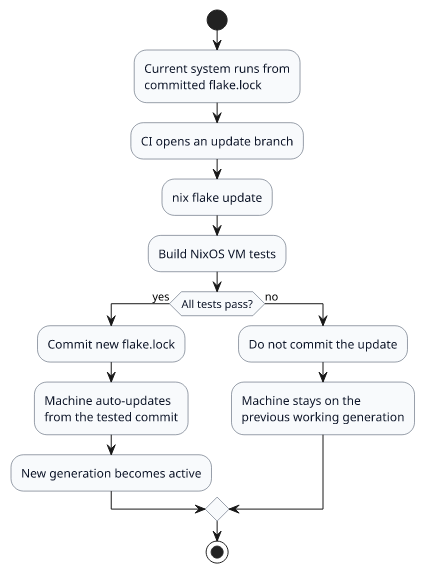
Of course, this is not the only way to achieve this and is probably a bit of an overkill for a developer laptop. But the same process works for servers and what I usually see is that updates rely on the vendor for supported versions and then becomes a huge headache when a major bump is needed, such as when it's time to move to the new Ubuntu LTS.
Also, I need the sense of closure: when I work on something I want to close that page before moving on to the next thing. The often-repeated phrase that "make a first version quickly and we'll fix the problems as they come" is not my modus operandi. When I implement something, I write the tests so that I know that it works in the future. Bringing this practice to the system-level is a huge motivation for me.
Testing the firewall
A perfect use-case for tests is the firewall setup. How is it usually done? A sysadmin configures nftables, verifies by hand, then that's it. If a later version breaks the setup, it may fail open: everything still works but the protection is gone.
How to test the firewall in NixOS?
The key here is reproducibility: let's start the same machine twice, start some service on both, disable the firewall on the second one, and then see whether they can reach each other. The idea is that the first one can reach the second one (as the firewall was disabled on that one) but the second can't reach the first. Since the only difference between the two machines is the firewall, this verifies that it works as expected.
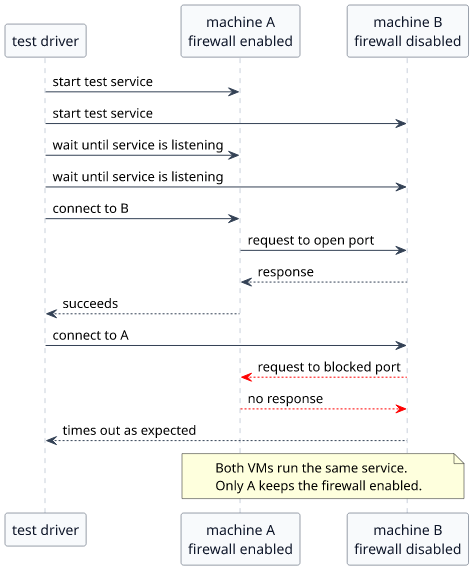
In code, this sets up the two machines:
nodes.machine = { pkgs, ... }: {
    imports = [ commonDesktopModule ];

    networking.hostName = "firewall-test";
};

nodes.unfiltered = { pkgs, ... }: {
    imports = [ commonDesktopModule ];

    common.firewall.enable = false;
    networking = {
        firewall.enable = false;
        hostName = "firewall-disabled";
    };
};
Then the test itself:
# start the servers
machine.succeed("systemd-run --unit blocked-http-server ${pkgs.python3}/bin/python3 -m http.server 18080 --bind 0.0.0.0 --directory /tmp")
unfiltered.succeed("systemd-run --unit unfiltered-http-server ${pkgs.python3}/bin/python3 -m http.server 18080 --bind 0.0.0.0 --directory /tmp")

# wait for start ...

# request fails when the firewall is enabled
unfiltered.fail("${pkgs.curl}/bin/curl --fail --connect-timeout 2 --max-time 3 http://firewall-test:18080/")
# request succeeds when the firewall is disabled
machine.succeed("${pkgs.curl}/bin/curl --fail --max-time 3 http://firewall-disabled:18080/")
Testing DoH
I wanted to configure DNS-over-HTTPS (DoH). Since systemd-resolved does not support it, it needs a bit more
work to set up: a DoH-capable resolver and some configuration that the system uses that. There is a Cloudflare test page that
shows whether the setup works.
How to test this build-time?
The correct test is to resolve a hostname and then verify that the correct HTTPS request is sent and the response is parsed correctly. There is a lot going on here.
We'll need two machines again: one runs the configuration under test, and the other acts as the HTTPS resolver. We'll need to forward all network traffic to the resolver, irrespective of the destination IP address, and need to add a certificate to the trusted store. This allows the resolver machine to intercept all traffic destined to the internet. Then it's a matter of verifying the request and providing a valid test response.
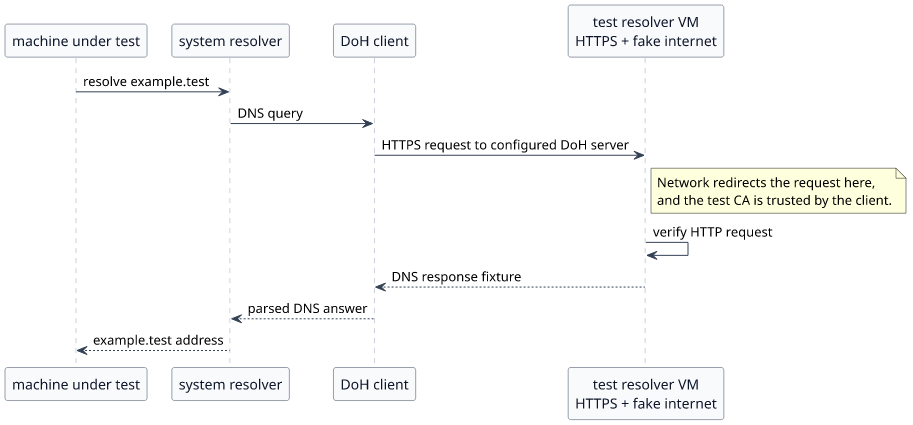
In code, the certificate is added to the machines:
nodes.ipv4Client = { pkgs, ... }: {
    imports = [ commonDesktopModule ];

    networking.hostName = "doh-upstream-ipv4";

    security.pki.certificateFiles = [ "${dohTestCerts}/ca.pem" ];
};
Then in the test:
# redirect traffic to the resolver
ipv4_client.succeed(f"${pkgs.iproute2}/bin/ip -4 route replace default via {peer_ipv4}")

# start the fake resolver
dns_peer.succeed("systemd-run --unit fake-doh-server ${pkgs.python3}/bin/python3 ${fakeDohServer}")

# send dig and verify the response is the expected IP
command = "${pkgs.dig}/bin/dig @{} {} {} +short +time=5 +tries=1 2>&1".format(server, question, qtype)
last_status, last_output = node.execute(command)

# check output, report success/failure ...
This is a powerful setup: it allows to test how the machine interacts with the internet. In this case, it was that a dig sends an HTTPS request to any of the
configured DoH servers, but it opens a lot of doors. Want to test that a certificate is requested from Let's Encrypt and then used in the webserver? It's a
matter of implementing the protocol on the second machine. Restic backups running? Intercept the traffic, implement the protocol, verify the responses. While
these require some work, having the possibility is a strong argument.
Next steps
I've just started getting familiar with NixOS and I haven't used it for anything serious. The first real test is going to be installing it to a laptop and testing the auto-update feature. The machine configuration will be on GitHub where a periodic action bumps the dependencies and runs the tests, then the laptop is updated from there. If everything goes fine, I'll have a stable and up-to-date distribution combining the advantages of rolling and conservative distros.

