
Backups with Restic: 2-year retrospective
How I set up my personal backups


Around 2 years ago I started looking into how I could back up my laptop and my phone. I went with Restic and multiple backends for storage and I'm fairly happy with the result, even though I overengineered it a bit.
This article is a retrospective: the thought processes behind the design, how it worked in the past 2 years, and what I'll change next when I feel like tinkering with it a bit more.
Having a reliable backup solution is an enabling piece of architecture. It allows me to rely on local tools touching local files without introducing the nightmare scenario of losing data during a hardware failure. I went full circle here in the past 2 decades. I started with having everything locally, then I bought-in fully to the cloud, now I'm moving back to local compute.
Basic setup
I started with a couple of hard requirements:
- The backup has to be client-side encrypted
- Open-source clients
- Supports multiple backends
This is the baseline for trust: I don't want to trust the backend with my data (client-side encryption), don't want to trust any closed-source client that can change critical functionality unilaterally (open-source client), and also don't want to rely on a single backend provider not pulling the rug out from under me (multiple backends).
I looked at BorgBase (not affiliated, just very happy with them) and they support Borg and Restic. The downside of Borg is that it needs backend support (it has its own protocol), while Restic works on plain files. I think Borg might be a bit more optimized, but I went with Restic because of its simplicity and for the amount of data I have I did not see any slowness.
BorgBase has 2 features that I realized are important for a backup: monitoring and append-only mode.
Monitoring is self-explanatory: whenever backups are missing for X days, I get an email. As backups usually fail silently, this gives me peace of mind. This was also the part that I overengineered in the end, as I'll discuss later in this article.
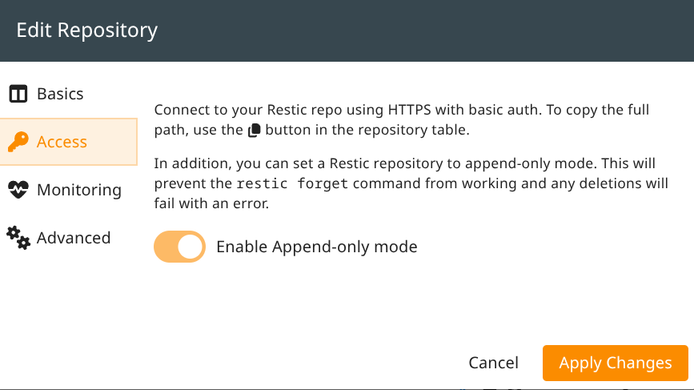
Append-only mode enforces that no files can be deleted, which Restic does not mind when creating new snapshots. To be able to delete something, I need to log in to the web console, and disable the append-only mode:
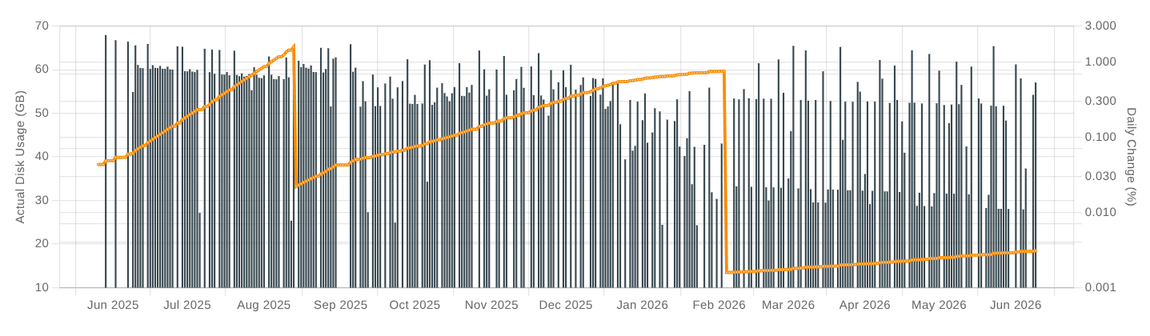
This gives the charts this seesaw pattern: whenever I'm running low on free space, I disable append-only mode and temporarily let Restic delete old snapshots.
Client-side
On the laptop, the configuration was rather simple. A systemd unit, roughly:
[Unit]
Description=Restic backup to %i

[Service]
EnvironmentFile=/etc/restic_configs/%i/config
LoadCredentialEncrypted=aws_secret_access_key:/etc/restic_configs/%i/aws_secret_access_key
LoadCredentialEncrypted=restic_password:/etc/restic_configs/%i/restic_password

Type=oneshot

ExecStartPre=/bin/sh -c '... restic unlock'
ExecStart=date
ExecStart=/bin/sh -c '... restic backup --group-by \'\' $BACKUP_DIRS $EXCLUDES'
ExecStart=echo "Backup complete"
ExecStart=/bin/sh -c 'if [ -n "${PRUNE}" ]; then ... restic forget $PRUNE --group-by \'\' --prune --compact; else echo "Skipping prune"; fi'
ExecStart=echo "Prune complete"
ExecStart=/bin/sh -c '... restic check'
ExecStart=echo "Check complete"
ExecStart=/bin/sh -c '... restic snapshots'
ExecStart=/bin/sh -c '... restic stats latest'
ExecStart=date
The steps it needs:
- unlock
- backup
- forget + prune
- check
- print some stats
Unlock is essential, as I found out. Whenever a backup crashes it keeps the repository permanently locked.
The forget and the prune are what discard old snapshots. They need a config to know what to keep, such as --keep-last 10 --keep-within-daily 30d --keep-within-weekly 6m. Also, it has to be optional, as when append-only mode is on this command will fail.
Restic needs a configuration of the URL of the repository (the RESTIC_REPOSITORY variable). This either encodes the credentials for the repo (in case of
rest: protocol) or it needs some other credentials (for example, s3: needs the usual AWS_ACCESS_KEY_ID and AWS_SECRET_ACCESS_KEY). These are loaded from
the EnvironmentFile and the aws_secret_access_key credentials.
Then Restic needs a separate RESTIC_PASSWORD, which the systemd unit loads from the restic_password credential. This is the client-side encryption password.
Finally, the systemd timer:
[Unit]
Description=Restic backup to %i
After=network-online.target

[Timer]
Persistent=true
OnCalendar=daily
RandomizedDelaySec=60m

[Install]
WantedBy=timers.target
Pruning
The pruning config defines the rules for which snapshots Restic should keep, and a good config staggers the kept ones. So the older the snapshots are, the fewer of them will be kept.
I ended up using this rather simple config:
--keep-last 10 --keep-within-daily 30d --keep-within-weekly 6mAnd it shows the pattern:
week of      Mo Tu We Th Fr Sa Su
2025-12-15   .  .  .  .  .  .  #
2025-12-22   .  .  .  .  .  .  #
2025-12-29   .  .  .  .  .  .  #
2026-01-05   .  .  .  .  .  .  #
2026-01-12   .  .  .  .  .  .  #
2026-01-19   .  .  .  .  .  .  #
2026-01-26   .  .  .  .  .  .  #
2026-02-02   .  .  .  .  .  .  #
2026-02-09   .  .  .  .  .  #  .
2026-02-16   .  .  .  .  .  .  #
2026-02-23   .  .  .  .  .  .  #
2026-03-02   .  .  .  .  .  .  #
2026-03-09   .  .  .  .  .  .  #
2026-03-16   .  .  .  .  .  .  #
2026-03-23   .  .  .  .  .  .  #
2026-03-30   .  .  .  .  .  .  #
2026-04-06   .  .  .  .  .  .  #
2026-04-13   .  .  .  .  .  .  #
2026-04-20   .  .  .  .  .  .  #
2026-04-27   .  .  .  .  .  .  #
2026-05-04   .  .  .  .  .  .  #
2026-05-11   .  .  .  .  .  .  #
2026-05-18   .  .  #  .  #  #  #
2026-05-25   #  #  #  #  #  .  .
2026-06-01   #  .  #  #  #  .  .
2026-06-08   #  #  #  #  #  .  .
2026-06-15   #  #  #  #  #  .  .
Why are Saturdays and Sundays missing lately? Seems like I don't use my laptop on weekends these days.
S3 backend
BorgBase worked with zero issues when I tested it for some time. But I wanted diversity of the backends. As Restic supports S3, I started looking into whether I could add that as a second backend.
First, permissions. Since this is a permanent credential, I needed an IAM user that has access to manage objects in a bucket:
{
	"Version": "2012-10-17",
	"Statement": [
		{
			"Effect": "Allow",
			"Action": ["s3:ListBucket", "s3:GetBucketLocation"],
			"Resource": "arn:aws:s3:::<bucket>"
		},
		{
			"Effect": "Allow",
			"Action": ["s3:GetObject", "s3:PutObject", "s3:DeleteObject"],
			"Resource": "arn:aws:s3:::<bucket>/*"
		}
	]
}
Then in Restic, I configured the RESTIC_REPOSITORY to the bucket: s3:s3.dualstack.eu-west-1.amazonaws.com/<bucket> and the user's credentials as
AWS_ACCESS_KEY_ID and AWS_SECRET_ACCESS_KEY. This allowed the backup to run.
Lifecycle rules
Putting the files into a bucket works, but it's not the most economical solution. Backups don't change and are very rarely read, so using a different storage tier other than the standard allows significant savings. And lifecycle rules make it easy to set up.
Let's put all objects into intelligent tiering other than the smallest ones where the per-object overhead would outweigh the benefits:
- Status: Enabled
  Prefix: "data/"
  ObjectSizeGreaterThan: 1048576
  Transitions:
    - StorageClass: INTELLIGENT_TIERING
      TransitionInDays: 0
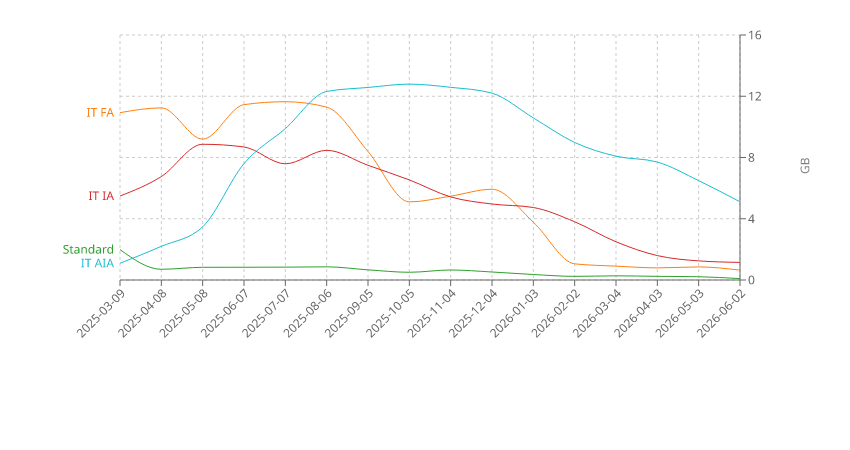
Intelligent tiering moves objects to colder storage based on their read patterns. If an object is not touched, it goes from frequent access to infrequent access then finally to archive instant access automatically, each level cheaper than the previous. And if an object is read, it is moved automatically back to the frequent access tier, which is important as the non-intelligent cold storage tiers incur read costs as well.
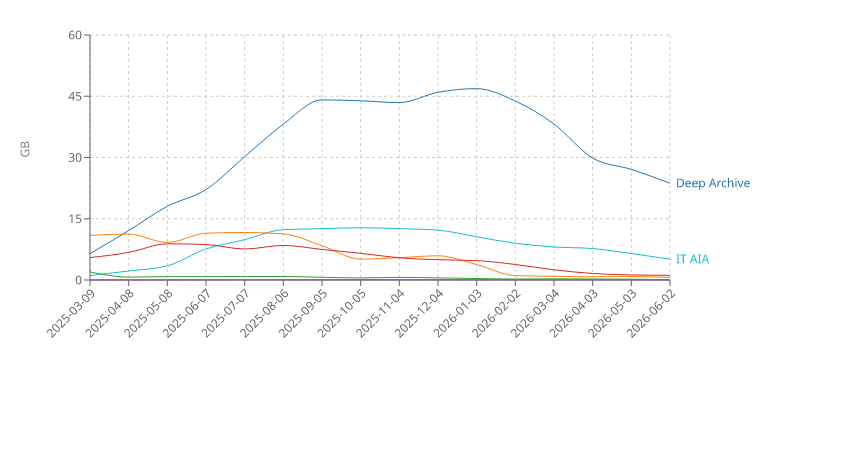
Initially, these transitions followed each other very clearly on the chart, but I don't have access to that period anymore. But this is how it looks for the past 15 months:
Delete protection
With lifecycle rules I could also get a safety mechanism similar to append-only mode. Whenever an object is deleted, it is put into the dirt-cheap deep archive storage tier and will get automatically deleted after 6 months.
This is called the NoncurrentVersionTransitions in S3 terminology:
- Status: Enabled
  Prefix: "data/"
  ObjectSizeGreaterThan: 1048576
  ...
  NoncurrentVersionTransitions:
    - StorageClass: DEEP_ARCHIVE
      TransitionInDays: 0
And to permanently delete them after 180 days:
- Status: Enabled
  AbortIncompleteMultipartUpload:
    DaysAfterInitiation: 180
  NoncurrentVersionExpiration:
    NoncurrentDays: 180
From Restic's perspective, all files are just normal objects, it can write new ones, and delete existing ones without complications. But if there is any problem where a snapshot is accidentally deleted, I can still manually recover it up until 6 months.
Seems like there is a significant churn on my laptop as the deep archive tier dominates everything else:
Costs
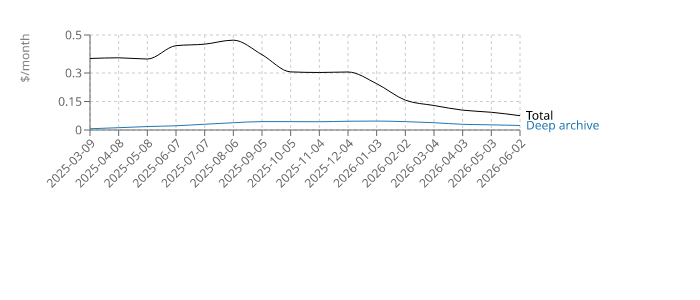
With these lifecycle rules, I get a very economical setup: intelligent tiering moves the data down to cheaper tiers, and deleted objects go to the cheapest one.
Ok, so how much does it cost me to store these?
The calculation is a bit involved as each tier is priced separately and there are different overheads that are added to different storage classes and the per-object fee can only be estimated. But here's the formula that I used:
# frequent access
it_fa / 10^9 * 0.023 +
# infrequent access
it_ia / 10^9 * 0.0125 +
# archive instant access
it_aia / 10^9 * 0.004 +
# standard plus the deep archive overhead
(std + da_oh) / 10^9 * 0.023 +
# deep archive plus the other deep archive overhead
(da_ooh + da) / 10^9 * 0.00099 +
# number of objects
(num_obj - da_ooh / 32768) / 10^3 * 0.0025

where:

* std	StandardStorage
* it_fa	IntelligentTieringFAStorage
* it_ia	IntelligentTieringIAStorage
* it_aia	IntelligentTieringAIAStorage
* da	DeepArchiveStorage
* da_ooh	DeepArchiveObjectOverhead
* da_oh	DeepArchiveS3ObjectOverhead
* num_obj	NumberOfObjects, AllStorageTypes
This gives:
Mobile
My phone has a different pattern. At some point I noticed that internal storage got so big that I no longer run out of space so I don't need to synchronize to Google Photos or a similar cloud service anymore. This is why the AIA line is higher:
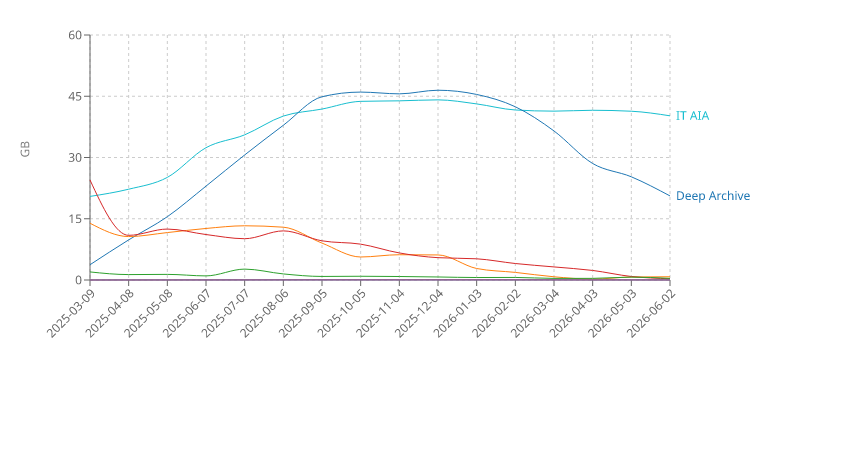
Why does the deep archive line goes down? Signal introduced cloud backups and after that I disabled file-based backup. Since each backup is encrypted separately, Restic can not deduplicate and has to write and then forget all these backup files.
And the estimated monthly cost:
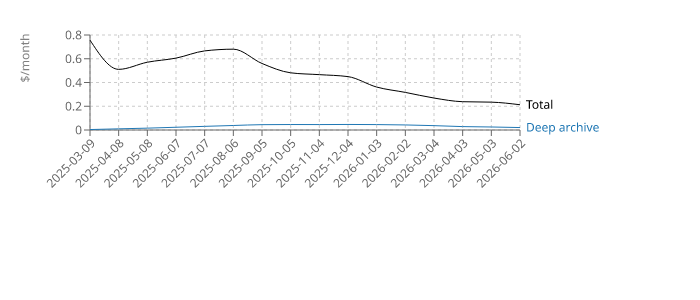
I think with S3 this setup is the lowest you can reach. Storing 40 GB of data in standard storage would cost $0.92. With this setup, it is ~$0.2.
Other providers
Supporting S3 opens up a lot of possible backends as many are S3-compatible. "S3-compatible" usually means it supports a subset of the S3 API, but fortunately Restic only needs the bare minimum so I did not encounter any problems with any providers so far.
There are two alternatives that I tried: Backblaze B2 and Cloudflare R2. While I didn't invest too much time into researching them, they both worked perfectly for the simple use-case.
I decided to keep them for an extra replication target for a few select directories and I stayed in their free tiers.
Monitoring
This was the point that turned out to be a bit overengineered. The idea was that I really liked BorgBase's monitoring function and I wanted to have that in a backend-agnostic way.
That moved the monitoring logic to the client-side, so I ended up with a NodeJS program instead of a series of ExecStarts. I generated packages for Arch,
Ubuntu, and Termux, so I can install and run on all systems I'm using.
Then I also needed the backend-side, which consisted of a Lambda function with some DynamoDB tables and a separate IAM user with permissions to call it.
Everything is in a giant CloudFormation template that you can find here if interested.
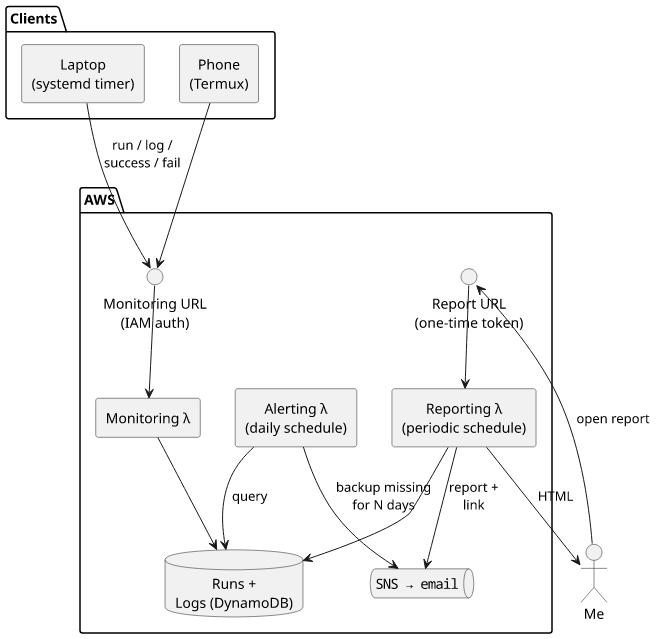
This monitoring is robust and granular: it allows me to have debug logging for each run, alerts me when a backup hasn't succeeded in X days, and also allows me to have a report every Y days.
On the other hand, I never needed to debug remotely and BorgBase's alerting was enough to catch when one of the clients was failing. So I'll probably remove this at some point and rely on a systemd service that monitors the timers.
Lessons learned
What went great:
- Restic with a systemd timer turned out to be rock-solid
- Append-only mode with BorgBase for protecting past backups
- Lifecycle rules on S3 with intelligent-tiering and delayed deletes
- Termux-based mobile client
This last part is what I'm a bit worried about. Termux has constant struggles with Android's permission system and it might break in the future. So while it worked almost flawlessly, I'm thinking about generating a native app that wraps Restic.
Restic's client-side encryption uses a symmetric algorithm. This is good because I don't have to worry about quantum computers accessing my data when a backend is compromised (ref), but it also means that if an attacker can break into the machine they get access to all past backups as well.

